

Restricting Products
There are several methods for restricting products in Shopify and blocking them from checkout.- Restrict Shopify Markets (Shopify Markets Method) - Un-publish the product for international markets in the Shopify Product Editor.
- Use Product Tags (Global-e Tagging Method) - Restrict the product from being sold in all Global-e operated countries using Shopify product tags.
- Use Global-e Merchant Portal (Merchant Portal Method) - Restrict the product for selected Global-e operated countries inside the Global-e Merchant Portal.
Which Method Should be Used?
Select the method according to relevant condition:Restricting Shopify Markets (Shopify Markets Method)
In Shopify, use the Publishing Products with Markets feature to specify in which markets to sell products. Markets that are not selected will be blocked for the product. This step can be performed using the product editor, bulk editor, or via CSV import.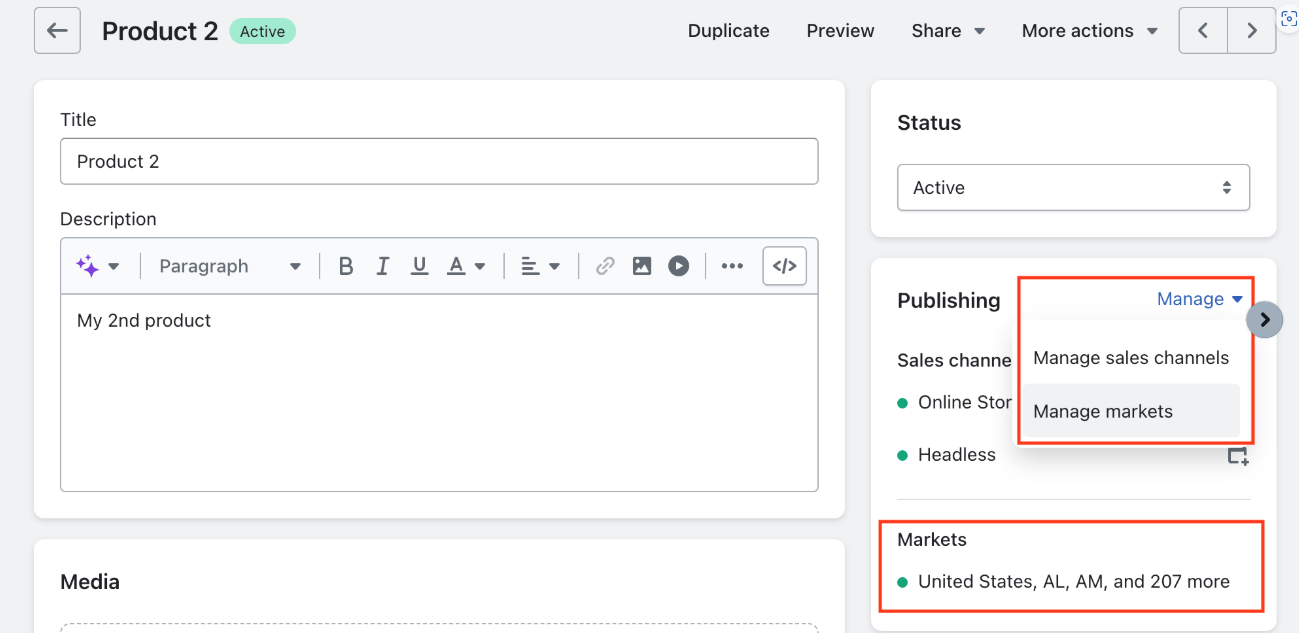
404 - Not found error. This can create the following issues.
- The product might not be browsable from unpublished countries.
- This may cause issues with SEO. Google crawler will receive
404error on the product link, so that the product will not be indexed for search. Therefore, use this method with caution outside of the United States. Even merchants within the United States may have issues if the Google crawler originates outside the United States.
Using Product Tags (Global-e Tagging Method)
Restrict a product tag for all countries This process applies to all Global-e operated markets.- Tag restricted products with the
isBlockedForGlobaleproduct tag. - The product appears on the merchant site but will be prevented from being added to cart and will be blocked at checkout.
- Restriction removal is done through the Global-e Merchant Portal.
Limitations
- If a product restriction tag is added to a new product, the product must be added to the cart and reach checkout before the restriction is applied on the Global-e side. To work around this, the merchant can send a CSV file of the restricted products to Global-e for a manual update, or simulate a checkout as soon as applying the tag.
- If a merchant has restrictions applied in the Merchant Portal only for a few variants of a product, Global-e scripts will restrict all variants on the Product Details Page (PDP).