> ## Documentation Index
> Fetch the complete documentation index at: https://docs-pro.global-e.com/llms.txt
> Use this file to discover all available pages before exploring further.
# Rotating Your Merchant GUID
Follow these steps to rotate your Merchant GUID on SFCC. Production and Staging are rotated separately, and Staging has additional steps.
**Before you start**
* Have your new Merchant GUID to hand.
* Your Merchant ID does not change.
* Questions? Contact your Global-e account manager.
Production
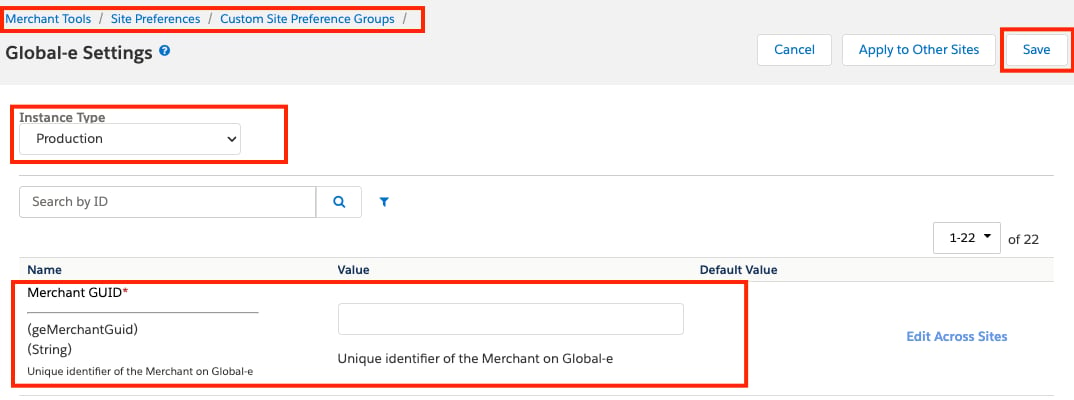
Open **Merchant Tools > Site Preferences > Custom Preferences > GLOBALE**.
Update **Merchant GUID** (`geMerchantGuid`) with the new GUID.
Save.
Repeat for **every Global-e-operated site** on the instance — Site Preferences are set per site.
The following figure shows the **Merchant GUID** (`geMerchantGuid`) field under **Custom Site Preference Groups**:
Staging
Follow the same process as Production, then complete the additional steps below.
Open **Administration → Operations → Jobs** and check whether the `GlobaleProducts` job exists and is enabled.
Use the decision list below.
### If the job exists and is enabled
Which of the two locations holds the GUID depends on your cartridge version.
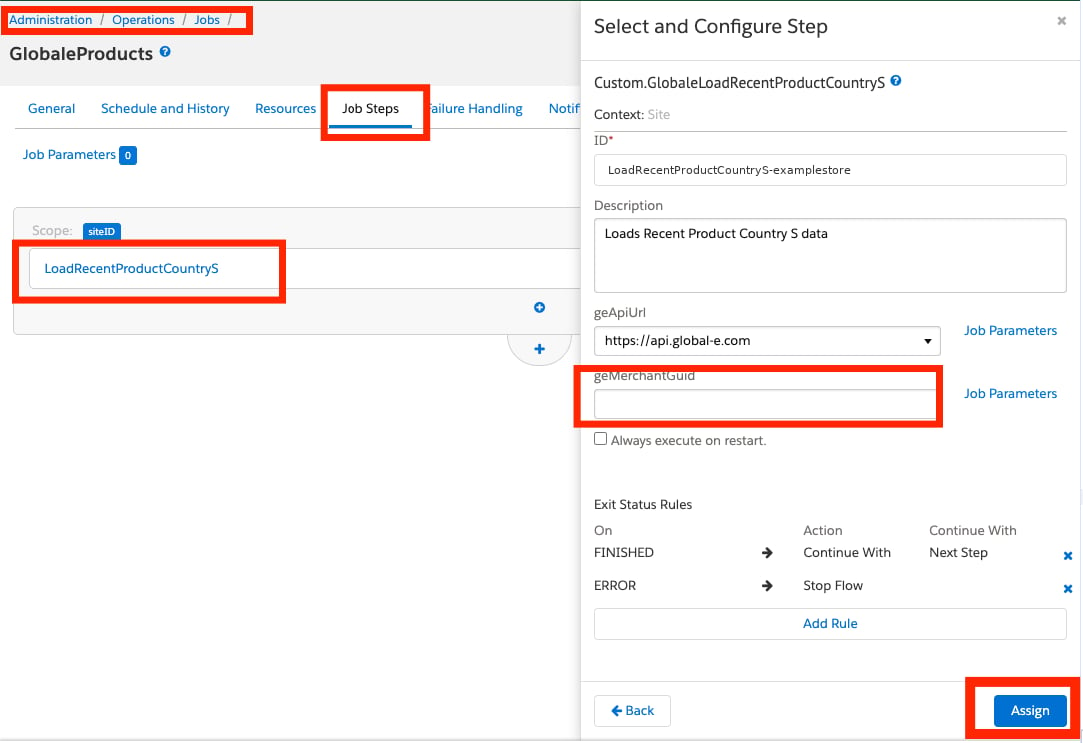
**Old versions of the Global-e SFCC cartridges** — open the job's **step configuration** and update the **Merchant GUID** parameter with the new GUID.
The following figure shows the `LoadRecentProductCountryS` step configuration, with the `geMerchantGuid` parameter:
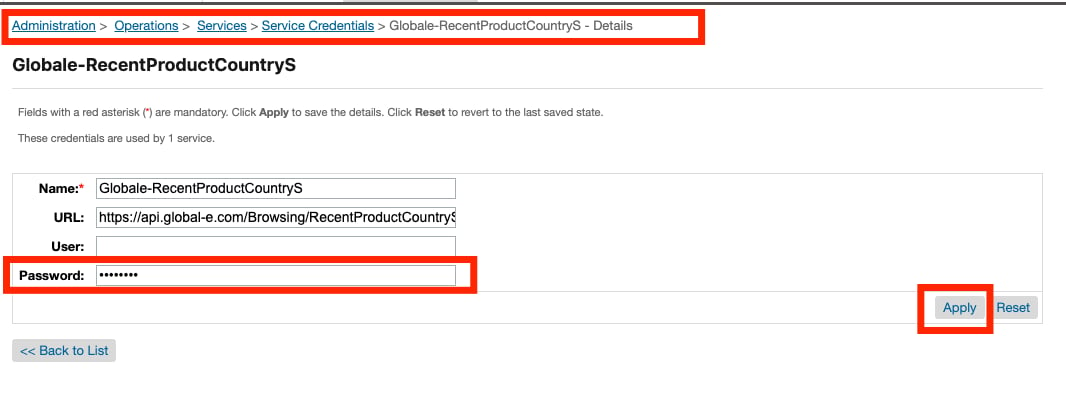
 **New versions of the Global-e SFCC cartridges** — check whether the SFCC service credential with ID `Globale-RecentProductCountryS` exists. If it does, open it and update the **Password** field with the new Merchant GUID.
The following figure shows the `Globale-RecentProductCountryS` row under **Service Credentials**:
**New versions of the Global-e SFCC cartridges** — check whether the SFCC service credential with ID `Globale-RecentProductCountryS` exists. If it does, open it and update the **Password** field with the new Merchant GUID.
The following figure shows the `Globale-RecentProductCountryS` row under **Service Credentials**:
 The following figure shows the **Password** field on that credential:
 If the job is enabled, one of the two locations above will contain the current Production GUID. Update it accordingly. It is also recommended to verify whether the `GlobaleProducts` job is enabled in **SFCC Production**, as some older merchants have this job enabled in Production.
### If the job is missing or disabled
No changes to the `GlobaleProducts` job are required.
## Need help?
Contact your Global-e account manager.
See also [API Authentication](/api-authentication).
If the job is enabled, one of the two locations above will contain the current Production GUID. Update it accordingly. It is also recommended to verify whether the `GlobaleProducts` job is enabled in **SFCC Production**, as some older merchants have this job enabled in Production.
### If the job is missing or disabled
No changes to the `GlobaleProducts` job are required.
## Need help?
Contact your Global-e account manager.
See also [API Authentication](/api-authentication).