|
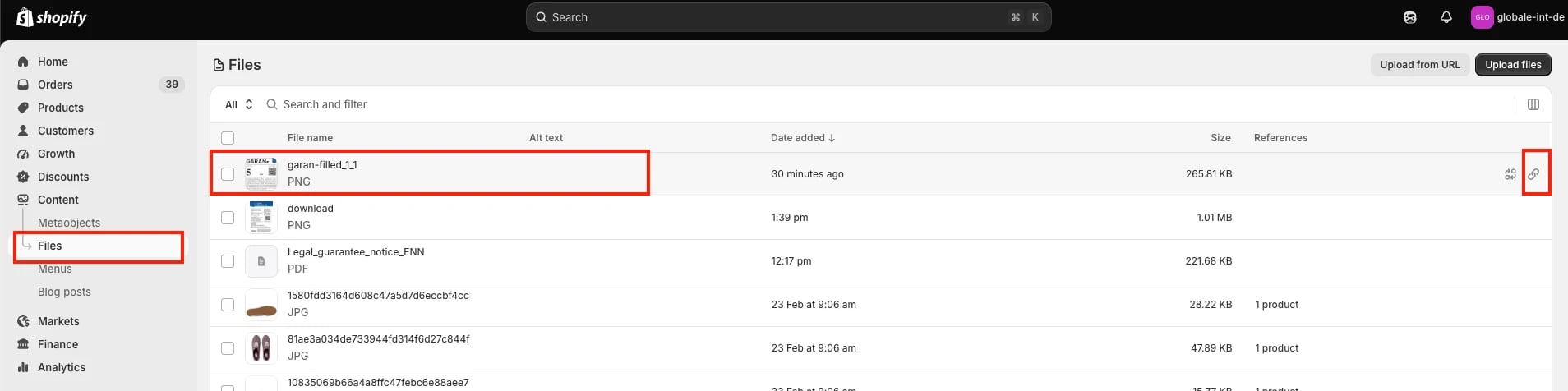 2. In Shopify admin, go to **Settings > Metafields and metaobjects > Products** and add a metafield definition to hold the GARAN label URL (e.g. a "URL" type field).
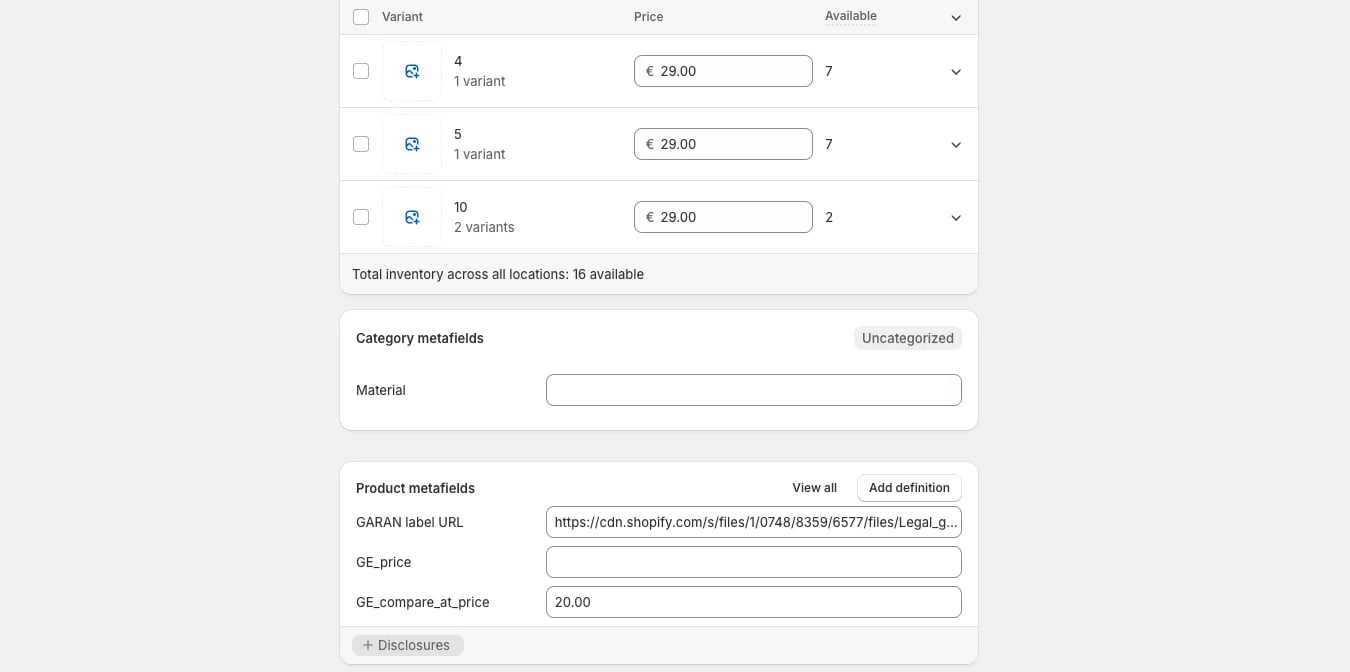 ## 2. Harmonised notice on the storefront
Unlike the GARAN label, the harmonised notice is not tied to a specific product; it must be visible somewhere on the storefront to any shopper browsing from an EU/EEA country, regardless of what they're viewing. The footer is a common, low-effort placement since it's already present on every page.
* Add the harmonised notice (as text, an image, or a link to a dedicated page) to a site-wide element such as the footer.
* Gate its visibility to EU/EEA visitors only. Most themes already have some form of country/market detection you can reuse for this.
**Example (native Shopify):**
1. Go to **Online Store > Themes > Edit code**.
2. Open the theme's footer section file.
## 2. Harmonised notice on the storefront
Unlike the GARAN label, the harmonised notice is not tied to a specific product; it must be visible somewhere on the storefront to any shopper browsing from an EU/EEA country, regardless of what they're viewing. The footer is a common, low-effort placement since it's already present on every page.
* Add the harmonised notice (as text, an image, or a link to a dedicated page) to a site-wide element such as the footer.
* Gate its visibility to EU/EEA visitors only. Most themes already have some form of country/market detection you can reuse for this.
**Example (native Shopify):**
1. Go to **Online Store > Themes > Edit code**.
2. Open the theme's footer section file.
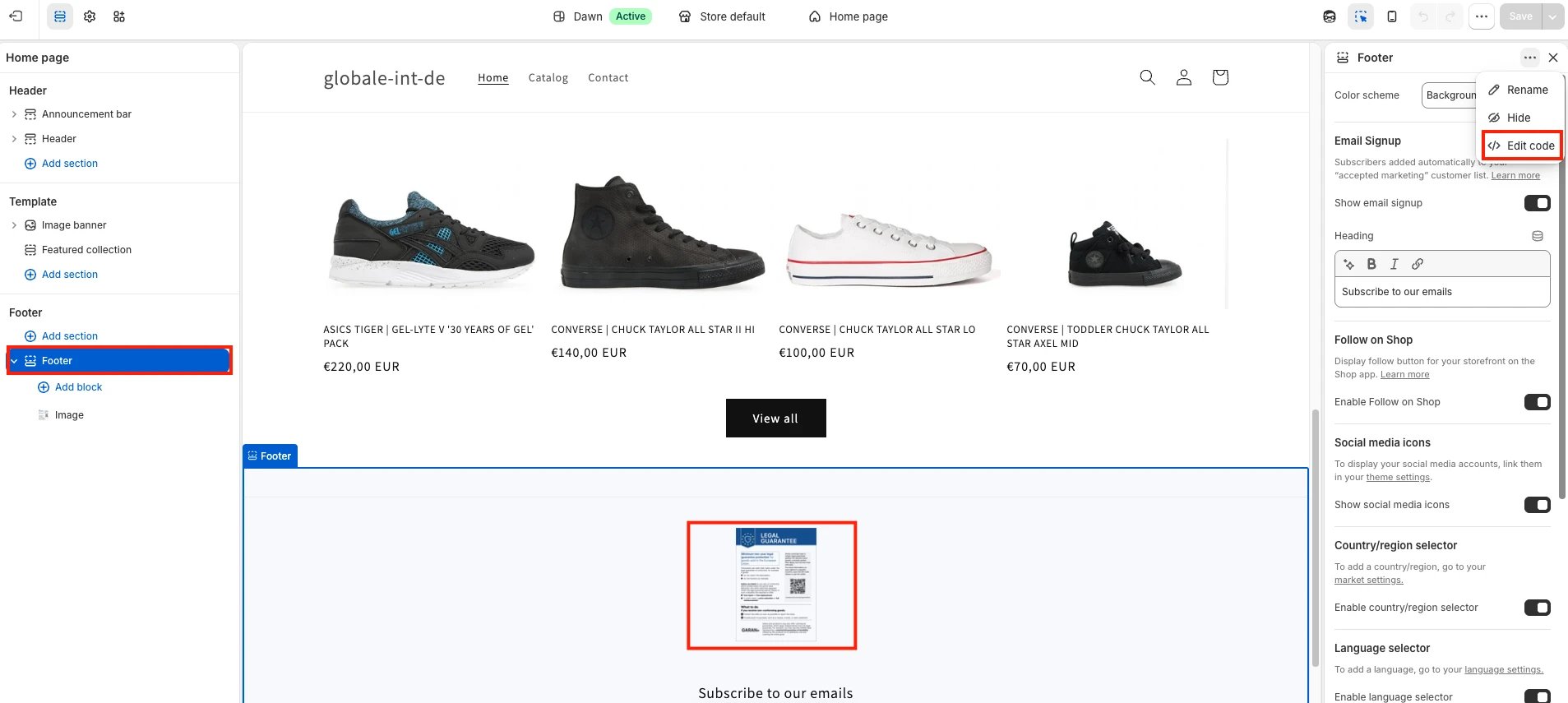 3. Insert the harmonised notice (image or text), gated to EU/EEA using your theme's existing localization/market logic.
4. Save, then preview the storefront with an EU market/location selected to confirm it appears.
## 3. GARAN label on the product page (PDP)
* Embed the GARAN label on the product page, visible to the shopper before purchase. Placement is flexible (near the product description, in a dedicated info block, etc.) as long as it isn't hidden behind an extra click, e.g. a collapsed tab that must be manually opened isn't sufficient.
* Gate rendering on the metafield being populated, so products without a label don't show a broken image.
3. Insert the harmonised notice (image or text), gated to EU/EEA using your theme's existing localization/market logic.
4. Save, then preview the storefront with an EU market/location selected to confirm it appears.
## 3. GARAN label on the product page (PDP)
* Embed the GARAN label on the product page, visible to the shopper before purchase. Placement is flexible (near the product description, in a dedicated info block, etc.) as long as it isn't hidden behind an extra click, e.g. a collapsed tab that must be manually opened isn't sufficient.
* Gate rendering on the metafield being populated, so products without a label don't show a broken image.
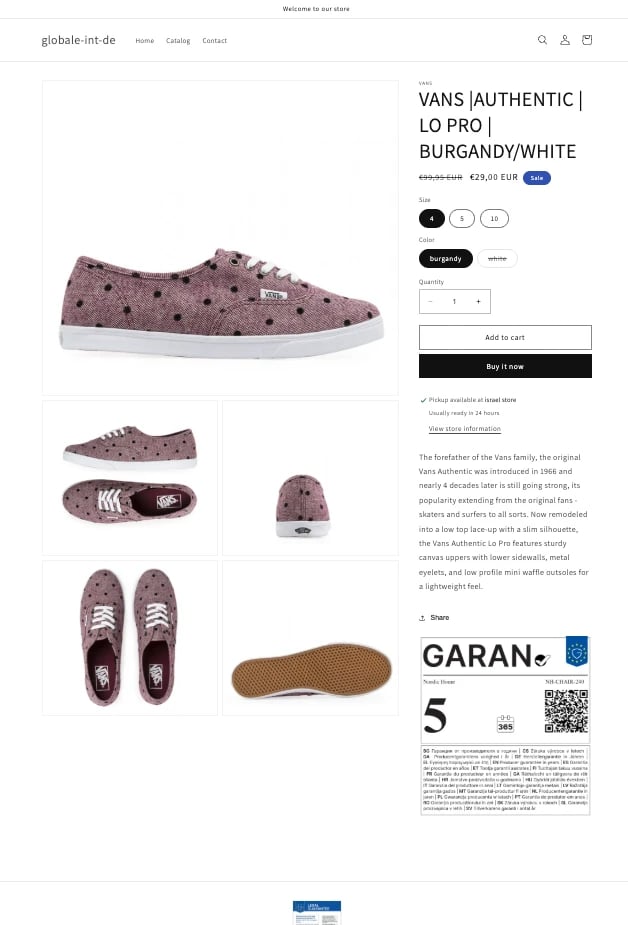 **Example (native Shopify):**
1. Still in **Edit code**, open the product template/section file used by your theme (e.g. the main product section).
2. Insert a snippet that reads the GARAN metafield for the current product and renders it as an image, only when the metafield is populated.
3. Save, then preview a product that has the metafield populated to confirm the label renders.
## 4. Harmonised notice in the order confirmation email
The harmonised notice must appear in every order confirmation email sent to an EU/EEA shopper, regardless of whether any product in the order has a GARAN label. The email footer is a natural place for it, since it's rendered once regardless of cart contents.
* Add the harmonised notice to the email footer (or another location that renders on every order).
* Gate it to EU/EEA destinations, based on the order's shipping (or billing, if you don't collect shipping) country.
## 5. GARAN label in the order confirmation email
This is separate from the notice above, and only applies when the order contains a product with a GARAN label.
* Embed the GARAN label(s) for the relevant line item(s) in the email body.
* Shopify's native notification templates don't support true file attachments. This is a platform limitation, not something you can configure around. Two paths:
| Path | How it works | Requirement |
| - | - | - |
| **A. Native Shopify** | Embed the harmonised notice and GARAN label as images directly in the email body (same approach as the PDP) | None, works on any plan. Image must be PNG. |
| **B. Third-party app** | Use an app that supports true file/PDF attachments to attach the notice as a document | Requires installing and configuring a compatible app. PDF is fine here, since it's a true attachment, not an embedded image. |
Most merchants use Path A, since it needs no additional app.
* Gate the GARAN block to EU/EEA destinations only (based on shipping country), so non-EU/EEA orders don't see it.
* Reuse the same per-product metafield from step 1 to pull each order's GARAN label(s) into the email.
**Example (native Shopify):**
1. Still in **Edit code**, open the product template/section file used by your theme (e.g. the main product section).
2. Insert a snippet that reads the GARAN metafield for the current product and renders it as an image, only when the metafield is populated.
3. Save, then preview a product that has the metafield populated to confirm the label renders.
## 4. Harmonised notice in the order confirmation email
The harmonised notice must appear in every order confirmation email sent to an EU/EEA shopper, regardless of whether any product in the order has a GARAN label. The email footer is a natural place for it, since it's rendered once regardless of cart contents.
* Add the harmonised notice to the email footer (or another location that renders on every order).
* Gate it to EU/EEA destinations, based on the order's shipping (or billing, if you don't collect shipping) country.
## 5. GARAN label in the order confirmation email
This is separate from the notice above, and only applies when the order contains a product with a GARAN label.
* Embed the GARAN label(s) for the relevant line item(s) in the email body.
* Shopify's native notification templates don't support true file attachments. This is a platform limitation, not something you can configure around. Two paths:
| Path | How it works | Requirement |
| - | - | - |
| **A. Native Shopify** | Embed the harmonised notice and GARAN label as images directly in the email body (same approach as the PDP) | None, works on any plan. Image must be PNG. |
| **B. Third-party app** | Use an app that supports true file/PDF attachments to attach the notice as a document | Requires installing and configuring a compatible app. PDF is fine here, since it's a true attachment, not an embedded image. |
Most merchants use Path A, since it needs no additional app.
* Gate the GARAN block to EU/EEA destinations only (based on shipping country), so non-EU/EEA orders don't see it.
* Reuse the same per-product metafield from step 1 to pull each order's GARAN label(s) into the email.
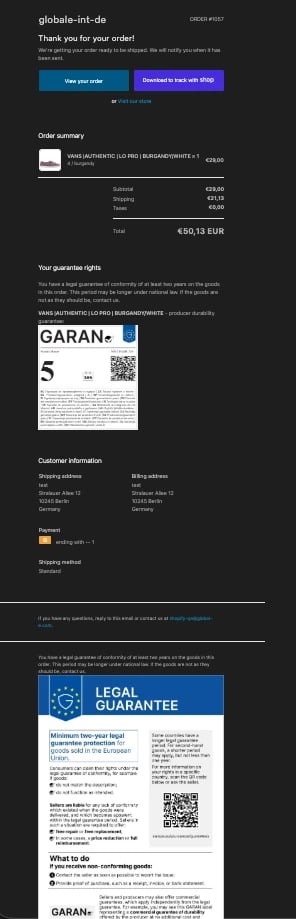 **Example (native Shopify, both step 4 and 5):**
1. Go to **Settings > Notifications > Order confirmation**, then **Edit code**.
**Example (native Shopify, both step 4 and 5):**
1. Go to **Settings > Notifications > Order confirmation**, then **Edit code**.
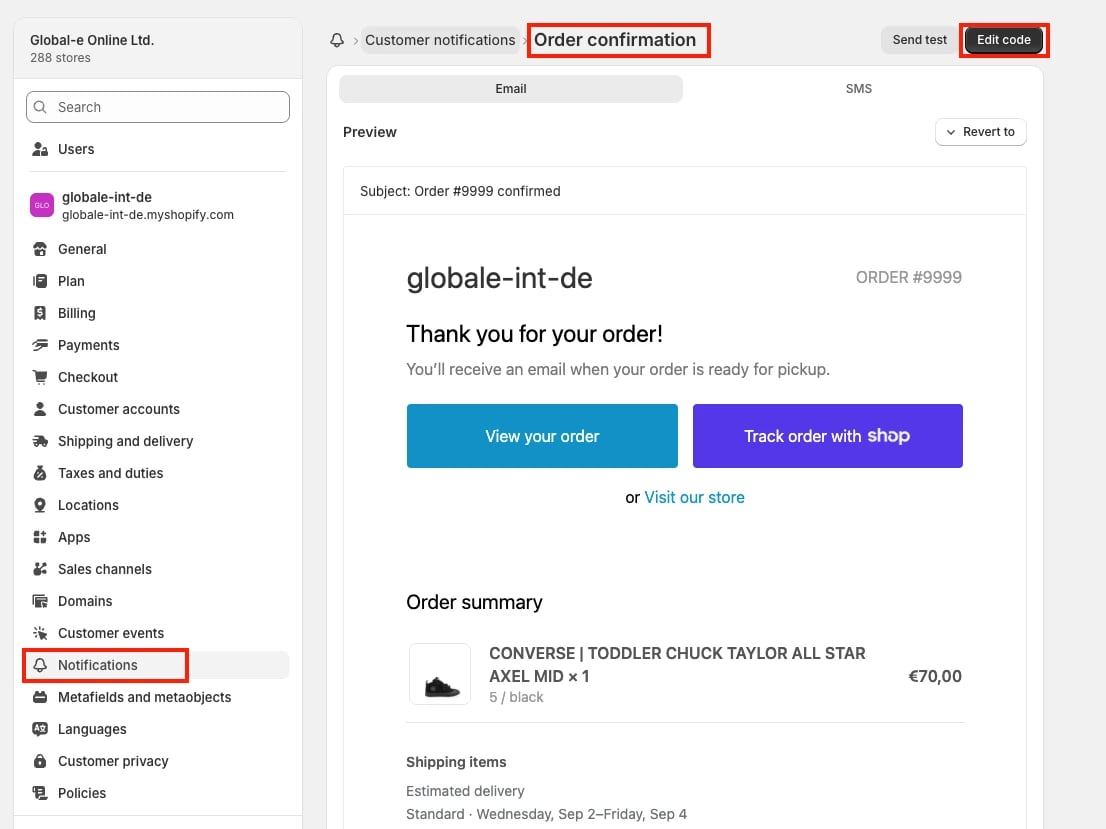 2. Insert the harmonised notice into the email footer, gated to EU/EEA shipping destinations, so it appears on every EU/EEA order.
|
|
